Know what your AI costs.
Forecast what comes next.
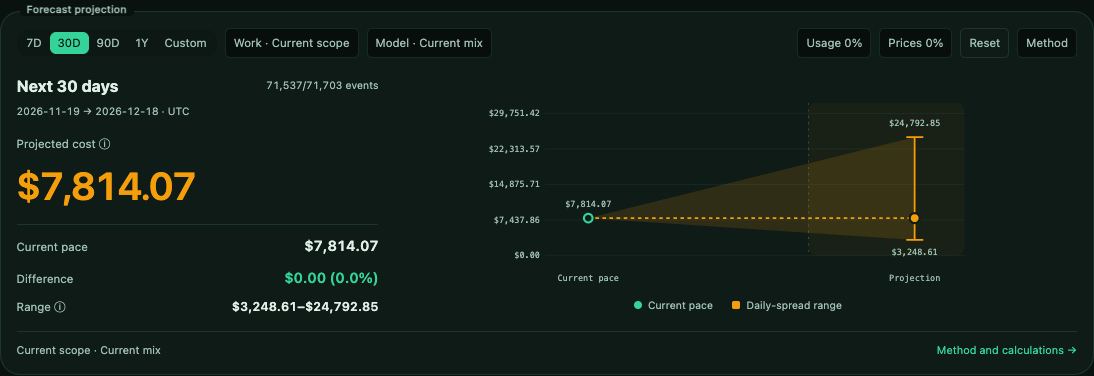
See costs by project. Model changes in usage and prices, compare AI models, and plan your next budget using your own data.
Inside GreenAI.
Explore the dashboard below, then try your own scenarios in the demo.

 Open the interactive dashboard
Plan before
you commit.
- 01Budget for a project.
See where captured AI costs went. Use that history as a starting point for the next project’s AI allowance.
- 02Plan for usage and price changes.
Adjust expected usage and prices. See how your forecast changes when your team’s plans change.
- 03Compare model costs.
Explore what the same captured token workload would cost at another model’s rates. Compare cost alongside your own quality and performance requirements.
Your projects.
Your cost baseline.
Bring supported coding tools into one view: Claude Code, Codex, GitHub Copilot CLI, Gemini CLI, and Pi.
GreenAI connects captured usage to repositories and projects, with Git evidence where available. Review coverage and assumptions alongside the forecast.
Costs are estimated from captured usage and model rates. They are separate from subscription payments.
How cost estimates workStart with
one device.
Create an account.
Start free. Choose a team plan when you’re ready to review shared projects.
Connect with the CLI.
Run Centrail on the computer where you use your coding tools. Choose the repositories to sync.
Review and forecast.
Inspect captured costs, choose your scope, and explore the assumptions for what comes next.
npx centrail@latest connect
Prompts, completions, and source code stay out of usage uploads.